How To Optimize Resources and Performance For Istio Proxy

Istio is a powerful service mesh that provides advanced traffic management, security, and observability features for Kubernetes applications. When starting with Istio, one of the most common challenges teams face is optimizing the resource usage and performance of the Istio Proxy (Envoy) sidecars and Ingress Gateway.
In this post, you'll learn how Istio Proxy works, what factors impact its resource consumption, and how to tune CPU, memory, and concurrency settings for both Ingress Gateway and sidecars.
Whether you're new to Istio or looking to fine-tune your existing setup, this guide provides practical examples and best practices to help you get the most out of Istio in your environment.
Before diving into optimization, it's important to understand the basic architecture of Istio and how the Istio Proxy fits into it. If you have some experience with Istio, feel free to skip next section.
Understanding Istio Architecture
Istio is a popular open-source service mesh that helps manage microservices traffic, security, and observability. Its architecture is divided into two main components:
Control Plane: This includes the Istiod pod and configuration resources that can be found in the istio-system namespace. The control plane handles configuration management, certificate rotation, and pushes user-defined configurations (like Virtual Services and Destination Rules) to the data plane.
Data Plane: This consists of sidecar containers (proxies) injected into application pods. These proxies are based on the Envoy proxy and are often referred to as Istio Proxy, Envoy Proxy, or simply Sidecar. They enforce the configurations from the control plane and enable features like traffic management, security policies, and observability.
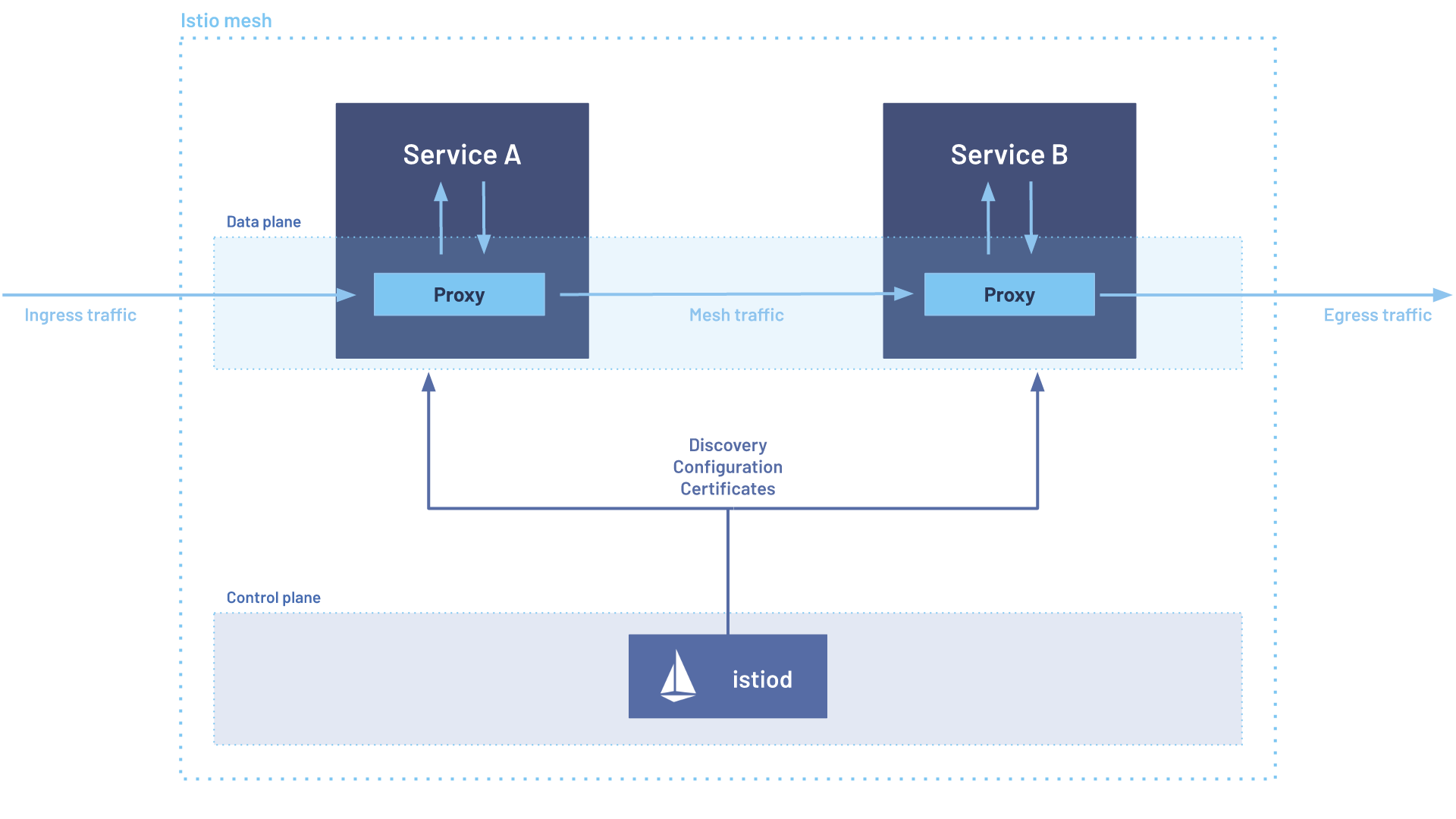
Note: The image above shows a typical data plane setup, where each pod contains both a microservice container and an Istio Proxy sidecar. The Ingress Gateway pod is an exception, as it usually contains only the Istio Proxy container to handle incoming traffic.
Istio Data Plane Performance and Scalability
While Istio offers powerful capabilities to developers, tuning its resource usage can be quite complex. The most difficult part of running Istio in large production environments, in my opinion, is optimizing the memory usage.
According to the Istio documentation, a typical Istio Proxy consumes:
- CPU: About 0.5 vCPU per 1000 requests per second
- Memory: Around 50 MB, though this can increase depending on the complexity of the configuration (such as the number of Virtual Services, Destination Rules, etc.)
As noted in the documentation, these numbers can vary significantly due to several factors, including:
- The size of requests and responses
- The number of CPU cores allocated to the proxy
- The protocols used (HTTP, gRPC, TCP, etc.)
- The number of configuration objects each proxy holds (injected from VirtualService, DestinationRule, and ServiceEntry). The more configuration the proxy has to handle, the more memory it will consume.
- Whether telemetry and monitoring filters are enabled
In the next sections, you'll learn how to optimize resource usage for both the Istio Ingress Gateway and sidecar proxies. These optimizations can be considered as a starting point that you can further adjust based on your specific workload and traffic patterns.
Optimizing Memory Usage for Istio Ingress Gateway
When adopting Istio, cluster administrators often choose one of these two approaches for the Ingress Gateway:
- Shared Ingress Gateway: serves workloads across different namespaces at once (usually, there is one Ingress Gateway per environment - dev, staging, production)
- Dedicated Ingress Gateways: each namespace has its own Ingress Gateway, which is only responsible for serving the workloads in that namespace, this is a common approach for multi-tenant clusters.
Whether you have a shared or dedicated Ingress Gateway, the first thing to check is the presence of the environment variable
named
PILOT_FILTER_GATEWAY_CLUSTER_CONFIG
in Istiod.
If this variable is not present or set to false, each Ingress Gateway will receive configurations for all Virtual Services defined
in the cluster, even those that are not relevant to the workloads served by that Ingress Gateway.
This default behavior can lead to a large amount of useless configuration being pushed to the proxy, which can subsequently lead to
increased memory consumption, especially in larger clusters with many services and complex routing configurations.
Setting this environment variable explicitly to true allows the Ingress Gateway to only receive configurations relevant to the
workloads it serves, which can significantly reduce the memory usage.
PILOT_FILTER_GATEWAY_CLUSTER_CONFIG=true
You can compare the before-and-after by running the following command to see how many clusters the Ingress Gateway is configured to handle:
istioctl proxy-config clusters <ingress-gateway-pod-name> -n <namespace>
After setting PILOT_FILTER_GATEWAY_CLUSTER_CONFIG=true variable (and restarting your Ingress Gateway pod),
you should see a significant reduction in the number of clusters.
# example, sanitized output
$ istioctl proxy-config clusters ingressgateway-abc -n istio-system
CLUSTER                                                   TYPE
outbound|80||service-a.default.svc.cluster.local           EDS
outbound|80||service-b.default.svc.cluster.local           EDS
# ...
Once the pilot is configured to filter the configuration for the Ingress Gateway, we can start optimizing the resource usage of the proxy itself.
When configuring the Istio Ingress Gateway, it's important to assign appropriate CPU and memory resources because even a small misconfiguration can cause huge problems. Since the Ingress Gateway pod typically contains only the Istio Proxy container, all assigned resources are dedicated to it.
For example:
resources:
  requests:
    memory: "128Mi"
    cpu: "300m"
  limits:
    memory: "256Mi"
    cpu: "1000m"
The most important aspect to consider when optimizing the Ingress Gateway is the CPU limit.
Pay special attention to the limits.cpu value.
Setting this as a multiple of 1000 (e.g., 1000m = 1 vCPU,
2000m = 2 vCPUs) allows you to optimize the concurrency setting for the Istio Proxy.
The concurrency
parameter controls how many requests the proxy can handle concurrently.
Misconfiguring this parameter can
increase memory usage and may lead to OOM kills.
If your Ingress Gateway experiences OOM kills while idle,
this is one possible root cause worth investigating, but generally I would always double-check this parameter is set
correctly
You can verify the concurrency parameter by running the following command inside the Ingress Gateway container:
curl localhost:15000/server_info | grep concurrency
You must ensure that the concurrency value is less than or equal to the CPU limit (in vCPUs) assigned to the proxy.
For example, if you set a CPU limit of 2000m (2 vCPUs), you can set concurrency to 1 or 2.
Concurrency Rule:
For example if you set a CPU limit of 2000m (2 vCPUs), you can set concurrency to 1 or 2.
To modify the concurrency value, you can define a ProxyConfig object for the Ingress Gateway.
apiVersion: networking.istio.io/v1beta1
kind: ProxyConfig
metadata:
  name: proxyconfig-ingressgateway
  namespace: <namespace>
spec:
  selector:
    matchLabels:
      app: ingressgateway
  concurrency: 1
After completing these optimizations you should see a significant improvement in memory usage of the Ingress Gateway.
Optimizing Memory Usage for Istio-Proxy Sidecar
Similar to what we saw earlier in the Ingress Gateway section, sidecar proxies by default store the configuration of Virtual
Services, Destination Rules, and Service Entries for all workloads in the cluster, including those not served by that proxy.
Istio helps address this problem with the Sidecar resource, which can be enabled globally, per-namespace, or
for individual workloads.
For those wondering, the Sidecar resource unfortunately does not apply to Ingress Gateways
as it is designed specifically for sidecar proxies; the Ingress Gateway is treated a special proxy, and it is not affected
by the Sidecar resource.
If you are running a multi-tenant cluster, where each namespace is virtually independent and serves different applications,
it's recommended to enable the Sidecar resource at the namespace level, like in the example below:
apiVersion: networking.istio.io/v1
kind: Sidecar
metadata:
  name: default
  namespace: <namespace>
spec:
  egress:
    - hosts:
        - "./*"
        - "istio-system/*"
The configuration above ensures that the sidecar proxy only receives egress configuration for services in its own namespace and
the istio-system namespace, avoiding receiving configuration for services in other namespaces that it doesn't need to handle.
If you are running a global mesh, where workloads in different namespaces can communicate with each other,
you can still use the Sidecar resource.
You may configure it to only receive configurations relevant to the
services/namespaces it serves, for example:
apiVersion: networking.istio.io/v1
kind: Sidecar
metadata:
  name: default
  namespace: <namespace>
spec:
  egress:
    - hosts:
        - "prod-namespace-1/*"
        - "prod-namespace-2/*"
        - "istio-system/*"
You can even be more specific and define the Sidecar resource at the workload level, using selectors to match specific deployments,
for example:
apiVersion: networking.istio.io/v1
kind: Sidecar
metadata:
  name: order-sidecar
  namespace: <namespace>
spec:
  workloadSelector:
    labels:
      app: order
  egress:
    - hosts:
        - "prod-namespace-3/*"
        - "istio-system/*"
Whether you choose to configure the Sidecar resource at the namespace or workload level,
you can verify the configuration received by the proxy by running the following command
(before and after applying the Sidecar resource):
# example, sanitized output
$ istioctl proxy-config clusters order-app -c istio-proxy -n my-namespace
CLUSTER                                                   TYPE
outbound|80||service-a.products.svc.cluster.local          EDS
outbound|80||service-b.logistics.svc.cluster.local         EDS
# ...
Using the Sidecar resource to limit the configuration received by each proxy can significantly reduce memory usage and improve
performance, especially in larger clusters with many services and complex configurations.
Configuring Sidecar, needs to be done
carefully, as it can lead to unintended consequences if not properly set up.
For example setting a Sidecar resource in istio-system
namespace lead to a global configuration for all the proxies in the mesh, setting at namespace level overrides the global configuration
for all the proxies in that namespace, and setting it at workload level overrides both the global and namespace configuration for that
specific workload.
Read all combinations in the
official Istio documentation.
Regarding resource allocation for sidecar proxies, CPU and memory values are often set globally in the Istio Control Plane.
You can find the default values in the ConfigMap named istio-sidecar-injector in the istio-system namespace.
Usually
the default values are:
{
  "resources": {
    "limits": {
      "cpu": "1000m",
      "memory": "1024Mi"
    },
    "requests": {
      "cpu": "100m",
      "memory": "128Mi"
    }
  }
}
The global configuration will be injected into all sidecar proxies by default, but it can be overridden on a per-pod basis. Many workloads work well with the default values, but for some workloads, especially those with high traffic or complex configurations, you may need to adjust these settings to optimize performance and resource usage.
You can override these defaults using pod labels and annotations, such as:
sidecar.istio.io/proxyMemorysidecar.istio.io/proxyMemoryLimitsidecar.istio.io/proxyCPUsidecar.istio.io/proxyCPULimit
In recent Istio versions, these values are only read from pod labels; annotations are ignored. The example below includes both labels and annotations for backward compatibility, but you can safely ignore the annotations in the latest versions of Istio.
Example:
apiVersion: apps/v1
kind: Deployment
metadata:
  name: hello
  namespace: <namespace>
spec:
  replicas: 1
  selector:
    matchLabels:
      app: hello
  template:
    metadata:
      annotations:
        sidecar.istio.io/proxyCPULimit: "2000m"
        sidecar.istio.io/proxyMemoryLimit: "2048Mi"
      labels:
        sidecar.istio.io/proxyCPULimit: "2000m"
        sidecar.istio.io/proxyMemoryLimit: "2048Mi"
        app: hello
    spec:
      containers:
        - name: nginx
          image: nginx:1.7.9
          ports:
            - containerPort: 80
As with the Ingress Gateway, the concurrency parameter for sidecar proxies should also be set according to the CPU limit
assigned to the proxy.
The same guidelines explained in the previous section apply here as well.
The CPULimit value is the upper bound for optimal concurrency and should be a multiple of 1000 (1000m,
2000m, 3000m, etc.).
Concurrency Rule:
So, as we have seen above, if you set a CPU limit of 2000m (2 vCPUs), you can set concurrency to 1 or 2.
For workloads, you can set the concurrency value using either of these methods:
- ProxyConfig object: Create a ProxyConfig for each workload, using selectors to match deployments.
- Annotations: Use the
proxy.istio.io/configannotation to set concurrency directly.
Example (ProxyConfig):
apiVersion: networking.istio.io/v1beta1
kind: ProxyConfig
metadata:
  name: proxyconfig-example
  namespace: <namespace>
spec:
  selector:
    matchLabels:
      app: hello
  concurrency: 1
Example (Annotation):
apiVersion: apps/v1
kind: Deployment
metadata:
  name: hello
  namespace: test
spec:
  replicas: 1
  selector:
    matchLabels:
      app: hello
  template:
    metadata:
      annotations:
        sidecar.istio.io/proxyCPULimit: "2000m"
        sidecar.istio.io/proxyMemoryLimit: "2048Mi"
        proxy.istio.io/config: |
          concurrency: 2
      labels:
        sidecar.istio.io/proxyCPULimit: "2000m"
        sidecar.istio.io/proxyMemoryLimit: "2048Mi"
        app: hello
    spec:
      containers:
        - name: nginx
          image: nginx:1.7.9
          ports:
            - containerPort: 80
In both cases, you can verify the concurrency value by running the same command we used for the Ingress Gateway, but this time inside the sidecar proxy container:
curl localhost:15000/server_info | grep concurrency
After completing these optimizations you should see a significant improvement in memory usage of the Istio Proxy sidecar.
Optimizing Scalability of Pods Using Istio Proxy
When optimizing pod scalability with Istio sidecars, it's important to consider that each pod now contains at least two containers: the application container and the Istio Proxy sidecar. This affects how Kubernetes Horizontal Pod Autoscaler (HPA) metrics are calculated.
When running multi-container pods, users often forget that HPA metrics are calculated from the average usage across all containers. The default behavior of HPA is as follows:
- Single-container pod: HPA triggers scaling when the CPU or memory usage of the container exceeds the target.
- Multi-container pod: HPA triggers scaling based on the average usage across all containers in the pod.
When adopting Istio (but this is also true for any multi-container pod), HPA should consider the two containers separately, the pod as a whole should scale if either the application container or the proxy container exceeds its respective target.
The following example outlines a common mistake when configuring HPA for a pod with an Istio Proxy sidecar. This HPA scales the pod based on the average CPU usage across both the application and the proxy containers.
Example of a basic (not recommended) HPA:
apiVersion: autoscaling/v2
kind: HorizontalPodAutoscaler
metadata:
  name: hello-hpa
spec:
  scaleTargetRef:
    apiVersion: apps/v1
    kind: Deployment
    name: hello
  minReplicas: 1
  maxReplicas: 10
  metrics:
    - type: Resource
      resource:
        name: cpu
        target:
          type: Utilization
          averageUtilization: 50
Recommended approach:
Instead, it is recommended to define separate scaling targets for the application and the Istio Proxy containers.
For example, you might set a CPU target for the proxy (e.g., 50-60%) and both CPU and memory targets for the application container.
This HPA configuration leverages
ContainerResourceMetrics.
Based on my experience the CPU should be the primary (or even the only) scaling signal of the istio-proxy;
memory usage is influenced not only by runtime factors, but also by the amount and complexity of the configuration loaded into the proxy.
My advice regarding memory would be to prefer fine-tuning the requests and limits rather than using memory as a scaling signal
apiVersion: autoscaling/v2
kind: HorizontalPodAutoscaler
metadata:
  name: moon-hpa
spec:
  scaleTargetRef:
    apiVersion: apps/v1
    kind: Deployment
    name: order-moon
  minReplicas: 1
  maxReplicas: 10
  behavior:
    scaleDown:
      policies:
        - type: Pods
          value: 1
          periodSeconds: 300
  metrics:
    # Istio-Proxy scaled based on CPU usage
    - type: ContainerResource
      containerResource:
        name: cpu
        container: istio-proxy
        target:
          type: Utilization
          averageUtilization: 50
    # Application container scaled based on CPU and Memory usage
    - type: ContainerResource
      containerResource:
        name: cpu
        container: order
        target:
          type: Utilization
          averageUtilization: 70
    - type: ContainerResource
      containerResource:
        name: memory
        container: order
        target:
          type: Utilization
          averageUtilization: 70
With this setup, the pod will scale if either the application or the proxy container exceeds its respective target.
Conclusion
In this post, you learned how to optimize resource usage and performance for Istio Proxy in both Ingress Gateway and sidecar configurations. This is a crucial aspect of running Istio efficiently in production.
While this guide provided a starting point for optimization, it's important to continuously monitor and adjust these settings based on your specific workload and traffic patterns. Resources should be validated with load testing and performance monitoring to ensure that your Istio deployment remains efficient and responsive as your application evolves over time.